Zero-downtime Postgres upgrades with logical replication
This is part 3 of a series about Postgres logical replication use-cases, and about how the feature set has evolved over the past ten years and ten releases (Postgres 10 through the Postgres 19 beta), one architecture at a time. Part 1 built a hub-and-workers system for write scalability and has the table of what each release added, which this post assumes. Part 2 consolidated several application databases into one warehouse. This one is the most common reason to touch logical replication at all: a major-version upgrade with no downtime, and a way back if it goes wrong.
The scenario: a major-version upgrade
A major-version upgrade — Postgres 16 to 18 here — needs new binaries, a
new data directory, and, traditionally, a window where the database is
stopped entirely. Two ways to get there, each addressed deliberately in
this post, not as an afterthought you hit near the end: stay in place
with pg_upgrade, whose --link mode is itself fast and whose newer
versions carry more of an existing logical replication setup across
than you might expect, but which still needs both servers down for that
window; or replace the in-place upgrade with logical replication
itself, publishing from the old server and subscribing from the new
one, to turn that full stop into a sub-200ms write stall with no outage
at all.
RTO, RPO, and the maintenance window
- RTORecovery Time Objective
- How long the application is actually down during the operation.
- RPORecovery Point Objective
- How much committed data you can afford to lose.
- Maintenance window
- A scheduled stretch with traffic stopped at the door, long enough to run
pg_dump/pg_restoreorpg_upgrade, then start traffic again. The oldest way to buy both RTO and RPO down to a known, predictable number.
Every extra piece of machinery in the logical-replication path below — reverse subscription, marker row, the LSN comparison — earns its place against those two numbers, not against “is it possible”. A maintenance window makes RTO the window’s length and RPO zero, because nothing was accepted during it — a legitimate answer whenever the business can afford the window.
What the logical-replication path buys instead is an RTO in
milliseconds (181 ms, measured below) without spending RPO to get
there — the reverse subscription keeps the rollback path’s RPO at
zero too, not only the forward one. The general ladder of rollback
strategies for a major upgrade, cheapest to most elaborate: a
plain-copy pg_upgrade (the default) leaves the old cluster untouched
and restartable; --link does not — once the new cluster has taken a
single write, its own documentation says the old cluster needs
restoring from backup, not restarting (--clone, where the filesystem
supports it, gets --link’s speed without that risk); or a live
reverse subscription, kept current continuously, so “roll back” is a
few hundred milliseconds rather than a restore job. Each step up
removes risk and adds a moving part that can itself go wrong.
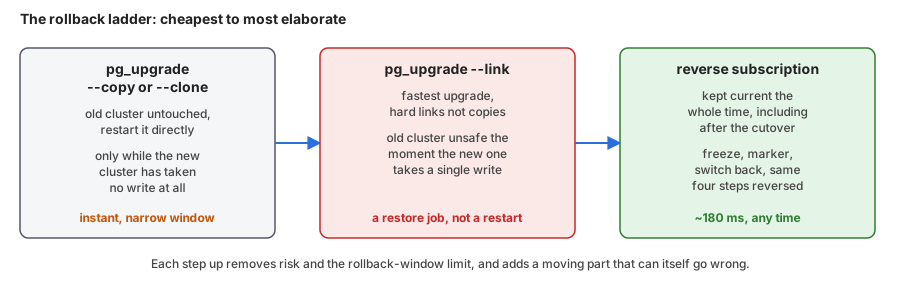 The rollback ladder, cheapest to most elaborate. Plain-copy pg_upgrade leaves the old cluster restartable, but only before the new one takes a write. Link mode is faster but then needs a restore, not a restart. A live reverse subscription keeps rolling back possible at any time, in milliseconds.
None of this is a new discipline dressed up for Postgres, either. It has a name, Continuous Migration, and it is a methodology, not a tool. Past the slogan, it comes down to keeping two different things separate: the testing, and the cutover window. The testing is the bulk of the work, and where most of the risk actually gets spent — not just the live request path, but every batch job and cron job that touches the database too, run against the new target until none of it is untested. Skip that and the surprises on D-Day aren’t surprises, they’re blind spots nobody went looking for. The cutover window is what’s left once that testing is done: short, and rehearsed enough times beforehand that its timings are known numbers rather than a guess, and its own blind spots have already been found and fixed by rehearsing it — the write stalls and failure counts quoted throughout this post are exactly that kind of rehearsal, not a single lucky run. A major-version upgrade has less to test than a cross-database port (same SQL, nothing to port), but the same two-part shape holds: test everything that touches the database first, rehearse the short window until it’s boring, then cut over.
That testing phase has a few items specific to a major upgrade.
pg_upgrade --check
catches most structural problems ahead of time, but not a collation
change: if the new cluster links against a different glibc or ICU
version than the old one, text indexes carry over sorted by rules that
no longer match, silently, and the fix is REINDEX before ALTER COLLATION ... REFRESH VERSION,
as detailed in Daniel Vérité’s write-up of the ICU 73 versioning
problem.
postgresql.conf gets the same scrutiny: a parameter can keep its
name while its default or its meaning changes between versions, so
diff it against the new release’s own sample file and read what the
release notes say about it. The mode itself belongs in the same
testing pass — Postgres 18 added --swap,
which beats --link on a cluster with many relations but is a harder
point of no return than --link ever was, so time it against --link
and --clone on your own schema before the real run.
pg_upgrade in place, and what it carries of logical replication
pg_upgrade --link has been there since Postgres 9.0, so the in-place
route is not new, and it is fast: --link never copies a table’s data
at all, just hard-links the files and rewrites the catalog, so its
running time tracks the number of objects, not the number of rows. I
timed it on the same tiny demo schema, then reshaped twice to isolate
each variable:
1,000-row table, one index:              1.69s
5,000,000-row table, 591 MB, one index:  1.64s
5,000 near-empty tables:                 6.47s
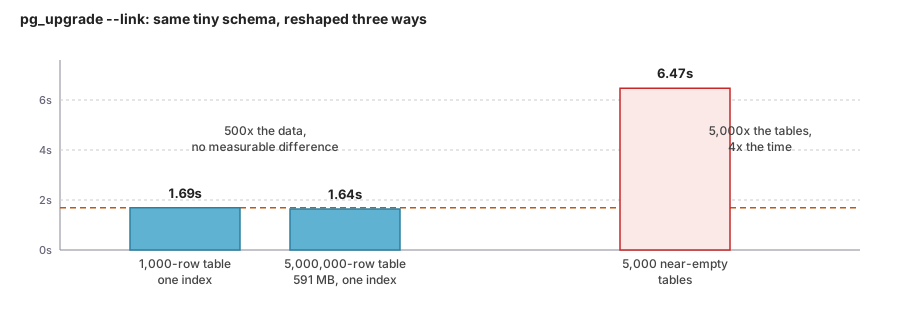 pg_upgrade --link timed on three reshapes of the same schema. 500x the data makes no measurable difference; 5,000x the table count takes 4x longer. Link mode hard-links files and rewrites the catalog, it never copies a row.
Five hundred times the data made no measurable difference; five
thousand times the table count did. So “shrink the window to
milliseconds” undersold pg_upgrade --link itself — for most schemas
it is already a matter of seconds, not a maintenance night. What it
does not avoid is the full stop: both servers down for however long
that takes, with no reads either, not just no writes. That is the
actual gap logical replication closes below: a sub-200ms write stall,
with reads and most writes available the entire time, instead of any
stop at all.
What Postgres 17 added is that pg_upgrade carries the logical
replication state across: its release notes say it migrates valid
logical slots and subscriptions, and that this only works when the
old cluster is Postgres 17 or later. I upgraded a Postgres 17 cluster
to Postgres 18 with pg_upgrade --link:
- A subscriber keeps its subscription, the state of each table, and its origin position, and stays enabled.
- A publisher keeps its slot, but only if the slot has consumed all the WAL:
The slot "sub" has not consumed the WAL yet. The new cluster needswal_level= logicalfrom the start. postgresql.confandpg_hba.confare yours to write; statistics counters are not carried over.- Postgres 18 refuses to upgrade a cluster that does not use data checksums
(
old cluster does not use data checksums but the new one does), unless the new one is initialised with--no-data-checksums.
A server older than Postgres 10 cannot be a publisher for native logical
replication — CREATE SUBSCRIPTION needs pgoutput, which needs
CREATE PUBLICATION, both Postgres 10 additions. pgcopydb follow
defaults to that same pgoutput plugin, so out of the box it inherits
the same floor. Two routes reach further back: pglogical supports
Postgres 9.4 and later as a provider, and so does pgcopydb follow
with --plugin test_decoding, Postgres’s own core output plugin, with
nothing extra to install on either server — or --plugin wal2json, an
external extension installed on the source only. More on both in the
next section.
Postgres 17 also changed what survives a different kind of disruption:
failover = true on create subscription synchronizes a subscriber’s
logical slots to a physical standby of the publisher, so a promoted
standby can keep serving the subscription without rebuilding it from
scratch. That is a big enough topic on its own — the publisher moving
instead of the subscriber — for its own demo, next in this series.
That’s the shorter way, when you can afford it. The rest of this post is what to do when you can’t.
pg_dump and pg_restore: the baseline
Before any of the above, there is the oldest answer, and it is worth
naming plainly because it is still frequently the right one: pg_dump
piped into pg_restore, or written to an archive and restored from
that. Its coverage is the whole point — it does not have the gaps this
post has spent several sections on. Sequences, materialized view
content, large objects, DDL run mid-migration: none of that is a
special case for pg_dump, because it dumps the database as the SQL
and binary data needed to recreate it, not as a stream of row changes
that leaves out everything that is not a row change. It also does not
care what the source version is, within reason — nowhere near the
Postgres 10 floor that CREATE SUBSCRIPTION has.
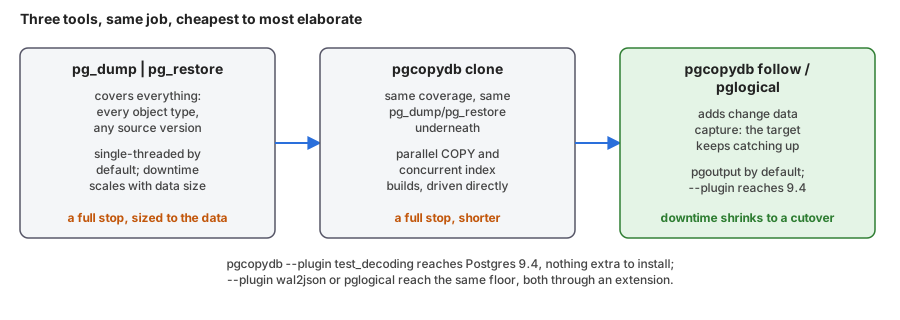 Three tools, same job, cheapest to most elaborate. pg_dump and pg_restore cover everything but downtime scales with data size. pgcopydb parallelizes the same work, same coverage, a shorter stop. pgcopydb follow, or pglogical, add change data capture so the downtime shrinks to a cutover event. pgcopydb follow defaults to the same pgoutput plugin as native logical replication; --plugin test_decoding reaches Postgres 9.4 sources with nothing extra to install, and wal2json or pglogical reach the same floor through an extension.
What it costs is the thing pg_upgrade --link and logical replication
both exist to avoid: the restore has to actually write every row again,
so downtime scales with data size, not with the number of objects. For
a small database that is nothing. For the kind of database that makes
this whole post worth writing, it can be the reason the “zero” in the
title matters.
pgcopydb is the tool I maintain for exactly this job, and it is
built on the same two commands, not a replacement for them: schema
through pg_dump/pg_restore, data through its own parallel COPY
implementation that bypasses their single-stream default and drives
index builds concurrently too. Same coverage, same source-version
reach, a shorter stop. When even that stop is too long, pgcopydb clone --follow adds change data capture on top. Out of the box it talks
pgoutput, the same Postgres 10 floor as native logical replication —
reaching the Postgres 9.4 sources pglogical covers takes --plugin test_decoding, Postgres’s own core output plugin with nothing extra to
install, or --plugin wal2json, an external extension installed on the
source only. pglogical remains the other option at that floor, and
earns its keep there specifically (more on it, and what it still does
that core cannot, later in this post).
None of this makes the earlier sections optional, and the disqualifying
cases run in both directions. A straight pg_dump/pg_restore, even
accelerated with pgcopydb, is ruled out the moment the downtime
budget is shorter than the time it takes to write the whole database
back out — at that point you need either pgcopydb clone --follow, or
full logical replication’s own initial copy, which can run for hours or
days before the cutover instead of during it, because it is not
holding up a maintenance window while it works. Going the other way,
pg_upgrade --link beats all three the moment its own conditions hold:
same filesystem, and a maintenance window that is acceptable at all —
reaching for a dump, a parallel copy, or a subscription to solve a
problem a few seconds of catalog rewriting already solves is solving it
the hard way. If the old side also happens to be Postgres 17 or later,
it is a better deal still: the subscriptions and slots already in place
survive the upgrade too, as the earlier section on it showed.
Which of these is even on the table also depends on a question this post hasn’t asked yet: is the new server the same hardware, or not.
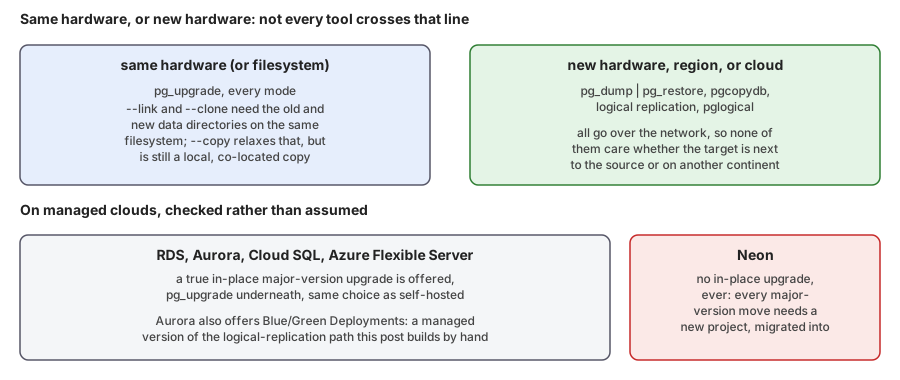 Same hardware or new hardware decides the tool. pg_upgrade needs the same filesystem, link and clone modes especially. pg_dump and pg_restore, pgcopydb, and logical replication all work equally to new hardware, a different region, or a different cloud. On managed clouds: RDS, Aurora, Cloud SQL and Azure Flexible Server offer true in-place upgrades; Aurora also offers Blue-Green Deployments, a managed version of the logical-replication path in this post. Neon offers no in-place upgrade at all.
pg_upgrade’s link and clone modes need the old and new data
directories on the same filesystem — that is not a Postgres restriction
so much as a hard-link’s, and it rules out moving to new hardware at
the same time as upgrading, on purpose or by necessity. pg_dump/
pg_restore, pgcopydb, and logical replication all go over the
network instead, so none of them care whether the target is next to
the source or in a different region entirely — which is also, not
coincidentally, when you most need them anyway.
What the managed clouds actually offer here varies more than the
self-hosted story does. RDS,
Aurora, Cloud SQL, and Azure Database for PostgreSQL Flexible Server
all document a true in-place major-version upgrade, pg_upgrade under
the hood, the same choice this post has been building by hand. Aurora
goes one step further with Blue/Green Deployments: a fully managed pair
of environments kept in sync with, by AWS’s own description, “PostgreSQL
community provided logical replication,” with a blocked-write switchover
under a minute — which is to say, a managed version of exactly the
architecture the rest of this post builds and times by hand. Neon sits
at the other end: no in-place upgrade exists at all, for any version
pair, and its own docs say so plainly — every major-version move needs
a new project, migrated into with the Import Data Assistant, pg_dump/
pg_restore, or logical replication. On a platform like that, this
section is not a fallback option, it is the only kind of option there is.
None of the in-place paths above help with a different move: changing
providers, not versions — a new cloud, a cloud back to on-prem, or
on-prem into a cloud for the first time. RDS’s and Cloud SQL’s in-place
upgrades and Aurora’s Blue/Green all assume the database already lives
in that provider; none of them says anything about getting it there.
All three major clouds ship a service for exactly that gap instead —
AWS Database Migration Service, Google’s Database Migration Service,
Azure Database Migration Service — each built from pieces this
post already covers, not something new.
AWS DMS does a pg_dump/pg_restore schema load, then switches to a
native publisher/subscriber setup for the CDC phase: the same Postgres
10 floor as the rest of native logical replication. Google’s service
does the same dump-and-restore followed by CDC through pglogical,
reaching the Postgres 9.4 floor — but only once pglogical is installed
and enabled on the source, which on a Cloud SQL source means a
cloudsql.enable_pglogical flag rather than a plain extension install.
Azure’s online mode adds a requirement of its own: a primary key on
every table. Where a source can’t take an extra extension, sits below
whichever floor the chosen service needs, or a vendor console simply
isn’t wanted in the critical path, running pgcopydb directly between
the two endpoints does the same job with the toolbox this section
already walked through.
Logical replication as the upgrade path
A subscription on the new server copies the tables and then follows the changes; a reverse subscription on the old server, prepared in advance, carries back whatever the new server writes after the switch, for the way back. I ran it upgrading a Postgres 16 server to Postgres 18, with the application writing the whole time.
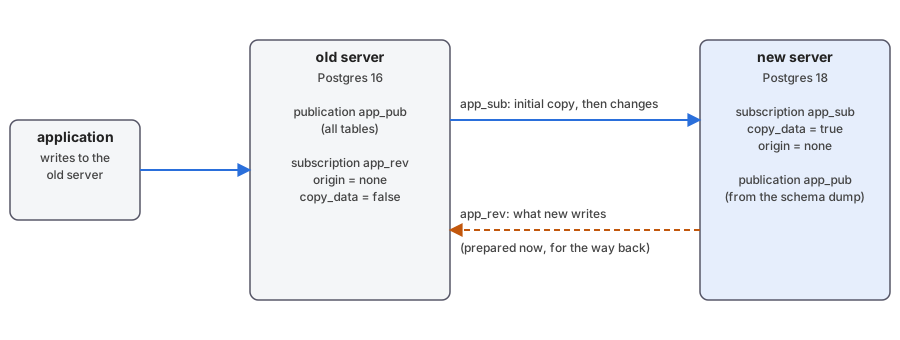 Before the cutover. The application writes to the old server. A subscription on the new server copies the tables and then follows the changes. A reverse subscription on the old server, prepared in advance, will carry back what the new server writes, for the way back.
Setting it up
The schema goes first, because DDL is not replicated. The roles come from
pg_dumpall, then the database and its schema from pg_dump, run with the
new major version’s tools against the old server:
pg_dumpall -h old --roles-only | psql -X -q -h new -d postgres
psql -X -h new -d postgres -c 'create database app owner app'
pg_dump -h old -d app --schema-only | psql -X -q -v ON_ERROR_STOP=1 -h new -d app
The roles restore reports one error, role "postgres" already exists, which is
harmless. The schema dump also carries the publication and the
REPLICA IDENTITY FULL settings, which matters below.
On the old server, one publication for everything:
create publication app_pub for all tables;
This is where a table without a primary key shows itself. Publishing changes
nothing until an update or a delete hits the table:
ERROR:  cannot update table "audit_log" because it does not have a replica identity and publishes updates
HINT:  To enable updating the table, set REPLICA IDENTITY using ALTER TABLE.
ERROR:  cannot delete from table "audit_log" because it does not have a replica identity and publishes deletes
HINT:  To enable deleting from the table, set REPLICA IDENTITY using ALTER TABLE.
The fix is replica identity full, which logs the whole old row, or a unique
index over not null columns used with replica identity using index:
alter table audit_log replica identity full;
Then on the new server, the subscription with the initial copy, while the traffic keeps running on the old one:
create subscription app_sub
       connection 'host=old dbname=app user=repl password=repl'
       publication app_pub
       with (copy_data = true);
and a query against
pg_subscription_rel to watch the copy. The states are i initialize, d data being
copied, f finished copy, s synchronized, r ready:
select srrelid::regclass as tbl, srsubstate
  from pg_subscription_rel
 order by srrelid::regclass::text;
[poll] +26ms rel_states: d=2 i=1 r=5
[poll] +546ms rel_states: d=1 r=7
[poll] +1064ms rel_states: r=8
initial sync of all tables finished
About 100 MB took a second to copy here. The details are in what is not there when the copy finishes:
- Sequences have
last_valueNULL on the new server, and the first insert fails on a duplicate primary key. - The materialized view exists and is not populated:
materialized view "sales_by_day" has not been populated. - Large objects are not replicated. The
oidcolumn that points to one is, so you getlarge object N does not existon the other side. - A stored generated column is recomputed by the subscriber, which is what you want.
- DDL during the migration: the old server does not notice. The new server’s
apply worker stops with
target relation "public.customers" is missing replicated column: "note", and a table created on the old side is not even known to the subscription untilalter subscription … refresh publication.
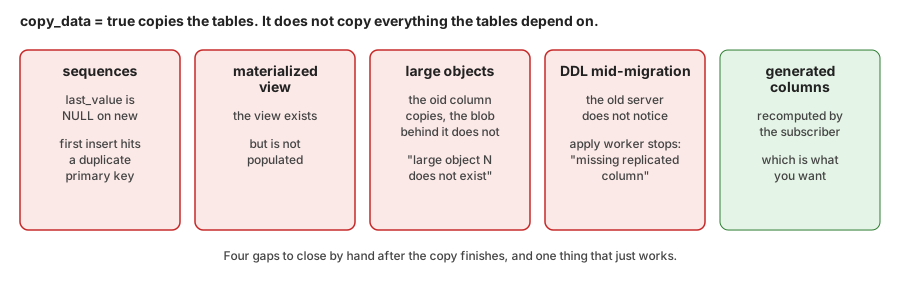 copy_data = true copies the tables, not what they depend on: sequences, materialized view content and large objects are missing, and DDL made during the migration goes unnoticed. The one piece of good news is generated columns, recomputed correctly by the subscriber.
Keeping DDL out of the window entirely
The gap above is really a policy failure waiting to happen: the fix is not
detecting a DDL statement that slipped through, it’s making sure none can.
That starts with roles. DDL has no business running under the same role
the application uses for insert/update/delete, migration or not —
give it its own role, driven only by deployment tooling, and “did anything
run DDL during the window” stops being a question you have to ask about
most of the schema.
The one place DDL tends to run on a schedule rather than from a deploy is
partition management, and that’s exactly what shouldn’t happen mid-migration:
a cron job calling create table ... partition of the moment a new day or
month starts has no idea a cutover is in progress. pg_partman already
solves this the other way around — its premake setting (p_premake in
part_config) keeps a configurable number of future partitions created
ahead of time, not just-in-time. Set it to cover a couple of months and
run_maintenance() has nothing left to create during any given week,
migration window included.
For everything else, a role convention is a policy, not a guarantee, which
is why I built preventddl: a plain event trigger, the same kind
documented on Postgres’s own event-trigger-example page, gated by one
setting, preventddl.enable. Load it through session_preload_libraries,
then alter system set preventddl.enable to true and select pg_reload_conf() before the migration window opens, the same the other
way after. Nothing holding DDL privileges but outside the deployment path
can touch the schema while it’s up — not a request to not run DDL right
now, an actual barrier.
The only thing the C module buys is the GUC: its entire job, by its own
source, is registering preventddl.enable as a properly typed boolean
so it lists cleanly in pg_settings — the event trigger function itself
is plain PL/pgSQL, raise exception behind a current_setting() check,
nothing compiled about it. The same guarantee is available without
session_preload_libraries, a GUC, or a line of C: define the trigger
function to just always raise, and toggle it with Postgres’s own
alter event trigger preventddl disable / enable, built into
core for exactly this. That version is plain SQL end to end — nothing
to compile, nothing to add to session_preload_libraries.
Preparing the way back
The way back is set up before the cutover, not after. The idea is a second
subscription in the other direction, so that writes made on the new server
after the switch reach the old one, and the old server stays current and ready to take the traffic
again. Two subscriptions in opposite directions on the same tables loop unless
they use origin = none, so both get it. The forward subscription first:
-- on the new server
alter subscription app_sub set (origin = none);
then the reverse one, on the old server, pulling from the new one. The
app_pub publication already exists on the new server, since the schema dump
carried it:
-- on the old server
create subscription app_rev
       connection 'host=new dbname=app user=repl password=repl'
       publication app_pub
       with (copy_data = false, origin = none);
I tested it with a row inserted on each side: each arrives on the other side once, and nothing bounces back. Three things to know:
- the forward subscription has to use
origin = nonetoo, otherwise the changes you replicate back would come around again (that is my reasoning, I did not test the failure); - the reverse subscription needs
copy_data = false: with it on, you getduplicate key value violates unique constraint "t_pkey"and a tablesync stuck in stated; - rolling back means copying the sequence values back, the other way.
Knowing when it has caught up
Everything hangs on one question at cutover time: has the new server
received everything the old one committed? Postgres 19 added WAIT FOR LSN, which
looks like the perfect tool for this. It is not, for a logical subscriber:
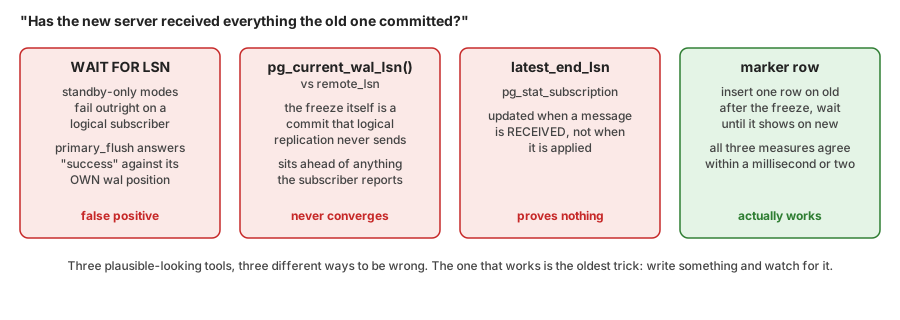 Three plausible-looking tools to check that the new server has caught up, each wrong for a different reason: WAIT FOR LSN is standby-only, a naive LSN comparison never converges because the freeze's own commit is never replicated, and latest_end_lsn is updated on receipt, not on apply. A marker row works.
16, 18: ERROR: syntax error at or near "WAIT"
19beta4: ERROR: recovery is not in progress (standby_* modes)
WAIT FOR LSN is for physical standbys. On a logical subscriber the
standby_* modes fail, and the primary_flush mode succeeds as soon as the
subscriber’s own WAL passes the number, a false positive against a
publisher’s LSN.
The working tool is what has always worked: compare the old server’s
pg_current_wal_lsn() with the position the subscription has applied,
from pg_replication_origin_status:
-- on the old server
select pg_current_wal_lsn();

-- on the new server
select remote_lsn
  from pg_replication_origin_status
 where external_id = 'pg_' || (select oid from pg_subscription where subname = 'app_sub');
There is a subtlety. The freeze on the old server (a
default_transaction_read_only setting) is itself a commit, on the
publisher side, that is never replicated, so it sits ahead of anything
the subscriber will ever report, and the comparison never converges. And
pg_stat_subscription.latest_end_lsn is updated when a message is
received, not when it is applied, so it proves nothing on its own.
What worked is a marker row: after the freeze, write one row on the old server, and wait for it to appear on the new one:
-- on the old server, once frozen
insert into cutover_markers (id) values ('cutover-old-to-new');

-- on the new server, repeated until it returns true
select exists (select 1 from cutover_markers where id = 'cutover-old-to-new');
With the marker in place, all three measures agreed within a millisecond or two.
The cutover
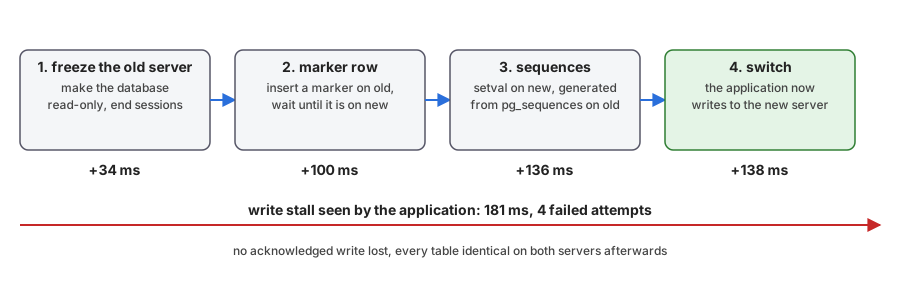 The cutover in four steps, with the time at which each one finished, counted from the start of the freeze. The application sees a write stall of 181 ms, the time between its last commit on the old server and its first on the new one.
The freeze makes the database read-only by default, and ends the sessions of the application role, so that nothing can start a write on the old server. Reads still work, and the DBA, who overrides the setting in their own session, is not affected:
alter database app set default_transaction_read_only = on;

select count(pg_terminate_backend(pid))
  from pg_stat_activity
 where datname = 'app' and usename = 'app';
Once the marker shows on the new server, the sequences. The setval
statements are generated from
pg_sequences on the old server and run on the new one:
select format('select setval(%L, %s, %L);',
              quote_ident(schemaname) || '.' || quote_ident(sequencename),
              last_value,
              true)
  from pg_sequences
 where last_value is not null;
select setval('public.customers_id_seq', 53084, true);
select setval('public.invoice_no', 604083, true);
select setval('public.measurements_id_seq', 303084, true);
select setval('public.orders_id_seq', 603084, true);
Then the application’s connection target changes to the new server. The timings the script recorded, and what the application saw:
[time] +34 ms old frozen, 0 app sessions terminated
[time] +100 ms new caught up (marker row visible: 98)
[time] +136 ms sequences copied (4 setval statements)
[time] +138 ms app switched to new
WRITE STALL old -> new: 181 ms
failed attempts inside the window: 4 (of 5 logged attempts, incl. the first success)
for scale: median gap between two commits 18 ms, p99 25 ms, over 3244 commits
The procedure took 138 ms from the freeze to the switch, and the application
saw a write stall of 181 ms, with four failed attempts (cannot execute INSERT in a read-only transaction) and then its first commit on the new server. No
acknowledged write was lost, and the content hash of every table matched on
both servers afterwards. My traffic loop reconnects for every transaction, so
no session had to be terminated: your connection pool will behave differently.
Rolling back
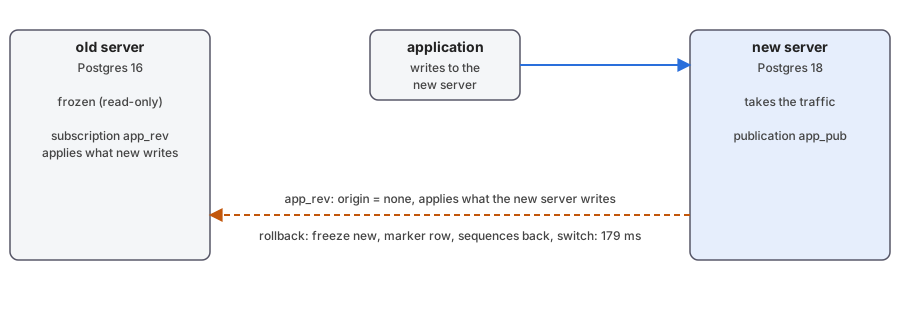 After the switch, the reverse subscription applies on the old server whatever the new server writes. To roll back, the same four steps run in the other direction.
Because app_rev has been carrying the new server’s writes back, the old server
is current, and rolling back is the same four steps in the other direction:
freeze the new server, wait for the marker to show on the old one, copy the
sequence values back, switch the application. It took 179 ms in the same
measurement:
[time] +34 ms new frozen, 0 app sessions terminated
[time] +101 ms old caught up (marker row visible: 99)
[time] +155 ms old unfrozen, sequences copied back (4 statements)
[time] +156 ms app switched back to old
WRITE STALL new -> old: 179 ms
Splitting the sequences, instead of copying them
The setval dance above assumes the freeze was airtight: nothing minted an
id on the losing side after the marker. Part 1 of this
series solved a
related problem — two servers independently minting ids for the same table
— with modulo and offset: give each side a sequence that increments by n
and starts on its own residue, so no two sides can ever produce the same
number. The same split applies here, with n = 2: old keeps the even
half of every sequence’s output, new the odd half, set up once before the
first cutover. It is not the same situation as Part 1’s permanent
co-primaries — only one side is meant to be writing at any time — but it
removes the one thing the rollback mechanism depends on getting exactly
right. A backend the freeze missed, a batch job connecting directly, a
race between PAUSE and the barrier: with a residue split in place, a
stray write on the “wrong” side still cannot collide with anything the
other side has minted or will ever mint, because the two streams never
share a residue, this cutover or the next. setval then becomes a
nice-to-have for contiguity, not the thing standing between a clean
cutover and duplicate key value violates unique constraint.
Generate it once, before the first cutover, with the same format() trick
used for setval above, and once both sides agree on last_value — right
after the initial copy, before either one has taken a write:
-- run once on each side; r is this server's residue, 0 on old, 1 on new
select format(
         'alter sequence %I.%I increment by %s restart with %s;',
         schemaname,
         sequencename,
         :n,
         last_value + 1 + mod(mod(:r - (last_value + 1), :n) + :n, :n)
       )
  from pg_sequences
 where last_value is not null;
Run with \set n 2 and \set r 0 on the old server:
alter sequence public.customers_id_seq increment by 2 restart with 53086;
alter sequence public.invoice_no increment by 2 restart with 604084;
alter sequence public.measurements_id_seq increment by 2 restart with 303086;
alter sequence public.orders_id_seq increment by 2 restart with 603086;
and with \set r 1 on the new server, the same four statements come out
one lower each, landing on the odd residue instead.
What it costs is what Part 1 already found: ids are no longer contiguous
on either server, every sequence skips every other value by design, and
the split is a standing commitment, not a one-time fix — widening it later
to more than two sides means picking a larger n and running this again
for every sequence. For two sides and a rollback window measured in
minutes, that is a trade worth making.
Privileges
create subscription for someone who is not a superuser needs
pg_create_subscription and create on the database, or you get
permission denied for database. The connection needs a password, or
password is required. And the initial copy then fails with role "migrator" cannot SET ROLE to "postgres" until the subscription owner owns
the tables. All three are Postgres 16 behaviour, and each is a security
feature worth knowing before it shows up as an error: a role check on
the subscription itself, a password requirement on the connection, and
an ownership check on the copy — three different checkpoints, not one.
The cutover, behind pgbouncer instead
Everything above still asks the application to switch targets: a config change, a DNS update, a connection pool told to reconnect. If the application already sits behind pgbouncer, there’s a shorter path — the application’s connection string never changes, because pgbouncer’s own backend target is what moves, not the application’s.
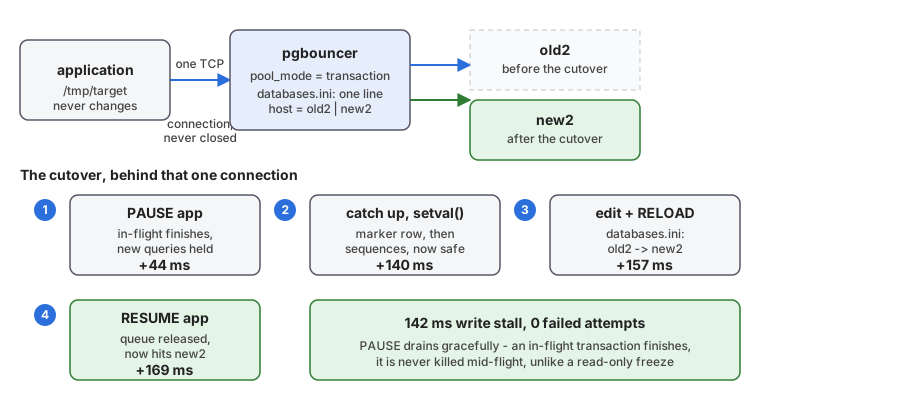 The application connects to pgbouncer only, the whole time. The cutover happens behind it in four steps: PAUSE holds new queries once in-flight ones finish, the backend target is edited and reloaded, then RESUME releases the queue onto the new server. Measured: 142 ms, zero failed attempts, the client's TCP connection to pgbouncer never closes.
pgbouncer’s admin console has exactly the primitive this needs:
PAUSE [db] waits for every in-flight transaction to finish, then holds
new ones — client sockets to pgbouncer stay open, new queries just sit in
the buffer. RELOAD picks up an edited [databases] entry. RESUME [db]
releases the queue onto whatever databases.ini now says. For this to
complete promptly, the pool has to be in transaction (or statement)
mode: in the default session mode, PAUSE waits for the client to
disconnect on its own before releasing the backend connection, which is
not a cutover, it’s a wait for nothing to happen.
I ran it on a fresh pair (old2/new2, independent of the pair above, so
part D of the demo can run standalone), with the traffic loop connecting
to pgbouncer for the entire run — /tmp/target is set once, before the
cutover even starts, and never touched again. The sequence: PAUSE app;
the marker-row catch-up and setval() from the earlier sections, run
directly against old2/new2 as the operator, bypassing pgbouncer; edit
databases.ini, old2 to new2; RELOAD; RESUME app.
That order is not arbitrary, and it’s worth walking through why, because
the mistake is easy to make and the symptom shows up well after the
cause. Copy the sequences before PAUSE instead of after, and you get
duplicate key value violates unique constraint after the switch: rows
old2 keeps committing in the gap between the sequence snapshot and the
barrier actually taking effect replicate in with their original, higher
ids, colliding with the lower ones new2’s under-counted sequence hands
out after resume. The fix is the same discipline as the
freeze-then-sequences order earlier in this post, just with PAUSE as
the barrier instead of a database-level read-only flag: establish the
barrier first, copy sequences only once nothing more can land on the old
side.
With that fix, three clean runs measured 142-151 ms of write stall, and —
the actual finding, not the number — zero failed attempts, all three
times. Compare that to the 180-200 ms with 4 failed attempts measured
earlier with a direct connection switch. The difference isn’t the pooler
being faster; it’s PAUSE draining gracefully where a read-only freeze
does not. A transaction that’s already running when PAUSE is issued
finishes normally against the old server, because PAUSE waits for it;
a transaction that’s already running when ALTER DATABASE ... SET default_transaction_read_only = on takes effect gets cannot execute INSERT in a read-only transaction immediately, because the freeze
doesn’t wait for anything. Nothing here is free: all application traffic
has to actually go through the pooler for the barrier to be airtight, and
one connection parameter tripped this up directly — PGOPTIONS (used
earlier in this post to let the admin bypass its own freeze) made
pgbouncer reject the connection outright, FATAL: unsupported startup parameter in options, because it isn’t in ignore_startup_parameters.
Not needed here, since PAUSE is the barrier, so dropped rather than
worked around — but it’s exactly the kind of thing a client that sets
session-level options would hit.
PAUSE’s own guarantee is also its own exposure: by its own docs, it
“will not return before all server connections have been disconnected,”
released according to the pool’s mode — in transaction mode, that
means every in-flight transaction has to actually finish first, and
nothing in pgbouncer puts a limit on how long that takes. A single long
transaction — a report, a batch job, or a connection the application
left idle in transaction waiting on something else entirely — turns
the 142 ms measured above into however long that transaction takes to
finish or get killed. The fix is the same ALTER DATABASE ... SET idiom
the freeze earlier in this post used, aimed at time instead of writes,
set right before the maintenance window opens and reverted after:
idle_in_transaction_session_timeout catches the most common real
offender, a transaction opened and then left waiting on the application
side; statement_timeout caps one running statement but nothing
between statements; and Postgres 17’s transaction_timeout caps the
whole transaction regardless of what it is doing, explicit or not,
which is the one that actually bounds PAUSE’s wait end to end —
whichever of the three is tightest wins, and the release notes warn
against setting transaction_timeout in postgresql.conf, since that
reaches every session on the server, not just the ones in the
migration’s path. Checking pg_stat_activity.xact_start for anything
already old before issuing PAUSE is worth doing too: the same
pg_terminate_backend used for the freeze earlier ends one found that
way immediately, rather than waiting out a timeout that was not in
place before the window opened.
None of this is the operator’s to fix on the application’s behalf. A timeout that kills a stuck transaction, or a cutover measured in milliseconds, only helps a client written to expect it: catch the error, retry the transaction, reconnect if the socket closed, and treat that as ordinary control flow, not an outage. The demo’s own traffic loop does exactly that, which is why its failed-attempt counts above are a true measurement, not a client giving up early. That is the developer’s responsibility, never the DBA’s — no server or pooler setting substitutes for an application that cannot survive its own connection being cut.
pgcat, PgDog, and HAProxy, for the same job. I did not build and time
these three the way I did pgbouncer above; this is what their own
documentation says. PgDog has the
closest equivalent, MAINTENANCE ON / MAINTENANCE OFF, described in its
own docs in almost the same words as pgbouncer’s PAUSE: “clients that
are currently executing a transaction will be allowed to finish, while
all others will be immediately paused,” with the same warning to raise
application-level timeouts first. pgcat is a half-step behind: its
RELOAD is, by its own README, “identical to PgBouncer” for picking up
configuration changes without dropping connections — but pgcat has no
documented PAUSE/RESUME. Without a barrier, a RELOAD alone redirects
connections only as the pool recycles them, not atomically, so there’s a
real window where some queries still land on the old backend after the
switch is logically done. HAProxy is a different kind of tool entirely,
and the gap isn’t a missing feature so much as what it is: a TCP proxy,
not a protocol-aware pooler. It never terminates the Postgres wire
protocol itself, so it has no way to decouple an already-open client
connection from its backend the way pgbouncer does. set server ... state drain stops new connections from reaching a backend but lets existing
ones run to completion on the old one; forcing the issue needs shutdown sessions, which kills them outright, and the client sees a hard
connection error and has to reconnect — closer to pgbouncer’s KILL than
its PAUSE. The pause-and-hold trick is specifically a connection
pooler’s trick, because only a pooler sits inside the Postgres protocol
instead of merely routing bytes past it.
One node, not the whole architecture
Everything above upgrades a pair; most production Postgres is a primary
with one or more standbys instead. Postgres’s own strategy for bringing
them along is narrower than it looks: pg_upgrade runs once, against
the primary, and every standby reaches the new version by rebuilding
from it over physical replication, never by being upgraded itself —
the new cluster comes out of initdb with its own system
identifier,
the value streaming replication uses to confirm a standby’s base backup
came from the primary it’s attached to, and a timeline restarting at 1,
so an old standby’s data directory simply belongs to a different
cluster now. pg_upgrade’s own docs
call for exactly that once the new primary is running, and Bruce
Momjian
and Magnus Hagander
have both confirmed the same on the mailing lists, in fewer words:
redone from scratch, not upgraded in place.
The same new identifier breaks the other two things a production
primary depends on. WAL archived before the upgrade is not a
continuation of anything the new primary writes, and pointing
archive_command at the old location risks exactly the failure
Stephen Frost described
on the mailing list: a server trying to recover from an archive that
belongs to a different system. Backups taken before the upgrade stay
good for restoring the old cluster and nothing else. Both need a fresh
start right after cutover — a new archive location, and a new base
backup — before the upgrade counts as done.
For the primary and its standbys, that’s the whole procedure, in order:
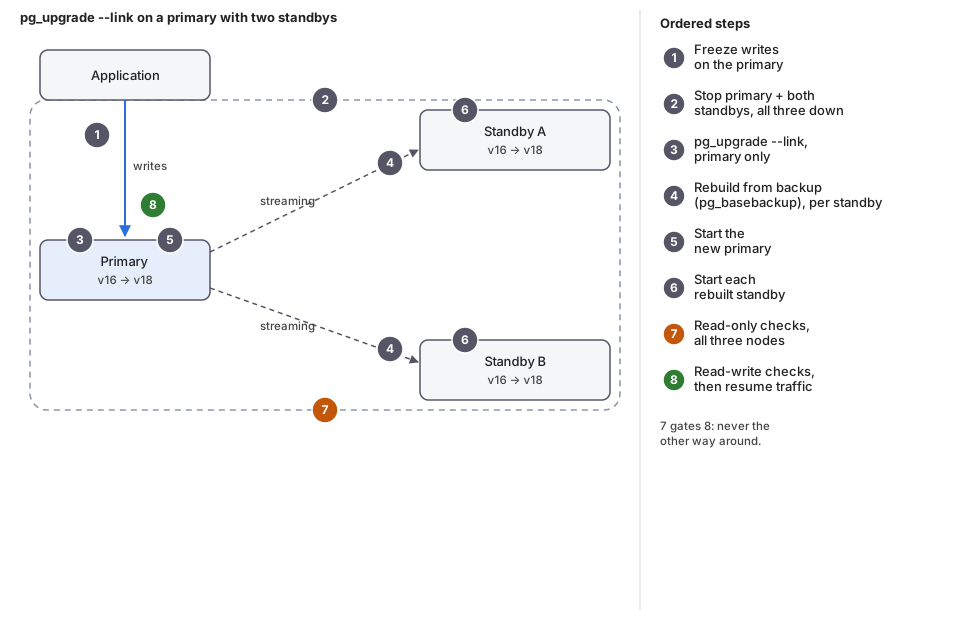 Upgrading a primary with two standbys using pg_upgrade --link. Freeze writes, stop all three, pg_upgrade --link on the primary only, rebuild each standby from a fresh backup, start the new primary, start each rebuilt standby, read-only checks on all three nodes, and only then read-write checks before resuming application traffic.
There is a second way to get a whole architecture to the new version,
not just the primary: build it twice. Stand up a new primary on the new
major version from a plain initdb, not pg_upgrade, and let logical
replication — the technique the rest of this post already walks
through — carry the data across the version boundary once. Everything
downstream of that new primary is then an ordinary, same-version
deployment: physical replication to its own new standbys, built and
caught up while the old architecture is still the one taking traffic.
Archive and backup storage don’t need duplicating along with it — both
primaries can feed the same WAL archive and the same backup target
right up to cutover, not two separate ones. Cutover becomes a traffic
switch onto an architecture that is already whole, not the start of
building one.
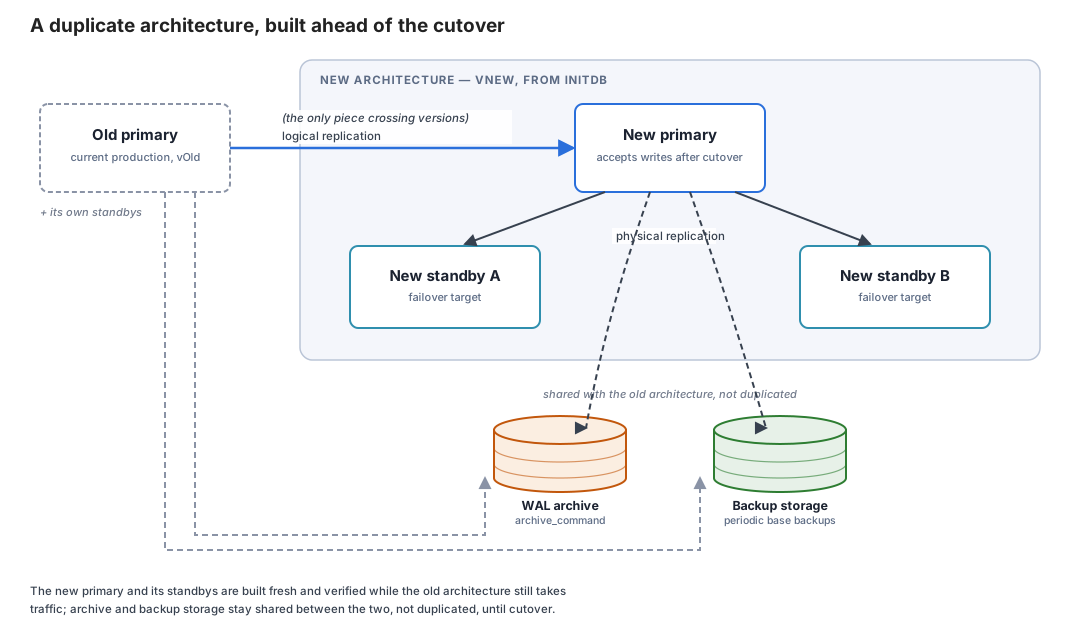 A duplicate architecture, built ahead of the cutover. The old primary feeds a brand new architecture through logical replication, the only piece crossing the major-version boundary. Inside it: a new primary on the new version, physical-replicating to its own new standbys exactly as the old primary did. Below, shared with the old architecture rather than duplicated: a WAL archive and backup storage, fed by both primaries.
Nothing in this post’s toolbox orchestrates either of these two diagrams
end to end yet, and neither does anything else — it’s on the public
roadmap for
pg_auto_failover, under “Cluster upgrades”: the same two paths as
above, “rolling upgrades orchestrated around pg_upgrade, node by
node” and “online, near-zero-downtime upgrades driven by logical
replication,” built into the tool instead of run by hand. It’s listed,
not shipped. If it’s worth having sooner, the
pricing page is where
sponsoring it moves the needle.
Where pglogical is still needed in 2026
From what I built and what its README says:
- Conflict resolution. Core detects and counts conflicts (Postgres 18) and lets you
skip a transaction (Postgres 15). It does not resolve them. pglogical has five
policies:
error,apply_remote,keep_local,last_update_wins,first_update_wins, and the timestamp-based ones needtrack_commit_timestamp. If your architecture is genuinely multi-active, with several nodes writing the same rows, this is the gap, and the descendants of pglogical are where the commercial answers live. - Automatic DDL propagation. Still not in core. pglogical has
replicate_ddl_command(), which is a manual queue; the “automatic” version is in its descendants. - Sources older than Postgres 10.
- Sets of tables as first-class objects, if you like that model.
And what it does not do: replica identity full, large objects, and
foreign key enforcement on the subscriber; it works one database at a time;
and from my own run, partitioned parents as targets crashed the apply
worker. EDB says new work goes into its Postgres Distributed product, so
plan accordingly.
Postgres 19: the part that may change
Everything in this section is from a beta, and the last month has taught me
to be careful. Postgres 19 lost several features on the way to release
(see the Postgres 19
preview and its update), so
treat these as “in beta 4 today”. All were re-run against
postgres:19beta4-bookworm after beta3: every behaviour below held, with
one piece of beta churn worth knowing about if you go looking for it
yourself — \h WAIT renamed itself from WAIT FOR to plain WAIT
between the two betas, doc URL included, though the statement you actually
type, WAIT FOR LSN '…', did not change.
Sequences replicate. Only FOR ALL SEQUENCES exists in this build (a
sequence-specific publication such as FOR SEQUENCE s1 is a syntax error).
The values reach the subscriber at the initial synchronisation and at
alter subscription … refresh sequences. They were still stale twenty
seconds after a change, so this is “on demand”, not streaming. A sequence
created later needs refresh publication first. It removes the manual
setval step of the upgrade in the third architecture. It does not give
workers non-colliding ids: the values travel from the publisher to the
subscribers, not the other way round.
EXCEPT. create publication … for all tables except (table …) works,
and so does alter publication … set all tables except (…). Excluding a
partitioned table excludes its partitions.
retain_dead_tuples. A subscription option, with max_retention_duration.
With it on, the same scenario that reports update_missing reports
update_deleted: “The row to be updated was deleted locally in transaction
N”. The counter is confl_update_deleted. It keeps a slot on the subscriber
(pg_conflict_detection) and wants track_commit_timestamp; without it you get
a warning. It is the first piece of what real conflict resolution needs, and
it is not resolution yet.
Logical decoding without a restart. effective_wal_level follows the
first logical slot: it says “logical decoding is enabled upon creating a new
logical replication slot”, and drops back to replica when the last one is
gone. A server with wal_level = replica accepted create publication.
Whether that is what you want on a production primary is a separate
question.
create subscription … server. It works, through postgres_fdw, so the
connection details live in a foreign server rather than a string.
Two lines from the run worth keeping. WAIT FOR LSN is standby-only, as shown
above. And a hub with many subscriptions runs out of two limits without a
friendly error: max_logical_replication_workers (the default is 4), and,
since Postgres 18, max_active_replication_origins (the default is 10), because every
subscription and every table being copied holds a replication origin. Past
that, the log repeats could not find free replication state slot for replication origin with ID 11, and the subscriptions sit in the i or d state
forever. My hub-and-workers demo hit the second limit at step 21, which is
why its compose file sets both.
Picking one, and testing the pick
Line the whole post up and the ladder is a complexity ladder as much as
a downtime one. pg_upgrade --link is the cheapest to run and to
reason about, but it only plays on same-hardware ground, and that’s not
a limitation anyone negotiates around. pg_dump/pg_restore and
pgcopydb clone come next, and between those two there’s little reason
to pick the slower one once pgcopydb is installed: same coverage,
and neither has the gaps logical replication’s own initial copy does.
No marker row, no setval dance, no replica identity full, no rule
about DDL ordering — a full dump/restore, parallel or not, simply does
not have the blind spots this post spent several sections closing,
because it moves the whole database as one unit instead of a stream of
row changes. Its downtime scales with data size, full stop, and for a
lot of real databases that stop is still shorter, and far less work to
get right, than everything logical replication demands in return.
What logical replication — native, pgcopydb follow, or pglogical —
buys past that point is real: downtime that shrinks from a stop sized
to the data to a cutover measured in milliseconds. It is also not
free, and this post is the itemized bill for it: a marker row because
no built-in tool answers “has it caught up,” a reverse subscription
prepared ahead of time for the way back, sequences copied or split by
residue to survive an imperfect freeze, DDL kept out of the window by
policy and by an event trigger, timeouts set so one stuck transaction
can’t hold the barrier open, and an application written to retry and
reconnect because nothing above substitutes for that. Behind pgbouncer,
the cutover itself gets shorter still, down to low hundreds of
milliseconds with zero failed attempts in these runs — but only once
everything above it already holds, and only if every client actually
goes through the pooler.
None of the numbers in this post are guarantees; they’re what one setup
measured. The only way to know your own maintenance window is the
rehearsal this post already named: run the actual cutover, on your own
schema, your own data volume, your own traffic, enough times that the
timing is a known number instead of a guess. The tool decides how much
there is to rehearse — a pgcopydb clone has almost none of it, a live
reverse subscription has all of it — not whether rehearsing it is
optional.
What is still on you
None of this is self-driving, and three things specifically stay the operator’s job no matter which path up this ladder you pick:
- DDL during the window. Nothing in
pg_upgradeor in logical replication stops a straycreate tableoralter tablefrom landing mid-migration — that takes a role convention, and if you want an actual barrier instead of a request, an event trigger, both covered above, but neither one is a default. - Testing and rehearsal. Every timing this post quotes is a measurement, from running the actual cutover more than once, not a number either tool promises. The only way to know your own window is the same rehearsal: tests first, then the short window run enough times that its numbers stop being a guess.
- A whole architecture, not just a pair. Neither path here is one
command for a primary, its standbys, and its archive and backup
together — that is hand-built today, on both sides of the ladder, as
the diagrams above show, and it is on
pg_auto_failover’s roadmap, not shipped by anything yet.
pg_upgrade --link, logical replication, and the hybrid that builds a
whole new architecture ahead of the cutover are the entire ladder this
post covers, cheapest and most restrictive at one end, most capable and
most work at the other. None of them removes the three items above —
they only change how much of the operation each one does for you.
A fourth post, covering the architectures left out of this series in less
detail — geo-replication, BDR-style multi-active setups, plain CDC and
triggers — is also planned.
Part 1
has the hub-and-workers demo,
part 2
the consolidation demo, and this post’s own demo is in its
compose/ directory.
Run them, break them, and tell me what I got wrong.
Second Edition, Updated (2026)
PostgreSQL 10 through 18, a new pgvector chapter, 56 new figures, and a free practice lab.
See what's new →